Language Help
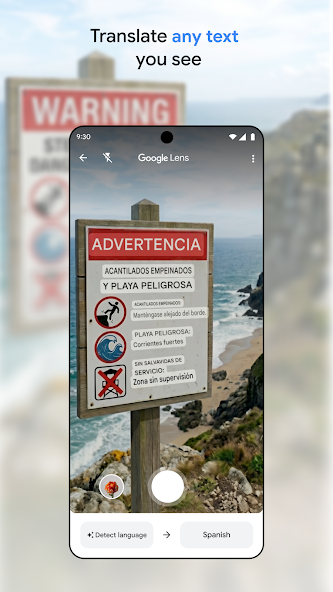
A camera translation can make unfamiliar text easier to approach. Small print, a poor angle or a missing word can still change the meaning.
How should I frame the text?
Get a clear view of the relevant sign or menu without including strangers or unrelated private information. Keep the text in focus and avoid cutting off the beginning or end of a sentence. Reflections and decorative fonts can make recognition harder. If the output seems odd, improve the image before repeatedly accepting the same result.
What should I verify separately?
Compare prices, dates, units, place names and negations with the original. For a menu, ask staff about a specific uncertainty instead of treating the app as an authority on ingredients. For a warning sign, follow the official instruction and seek clarification if necessary. Do not use a machine translation alone for a consequential medical, legal or safety decision.
Will it work with no connection?
Google provides downloadable language options for offline use, but availability differs by language and feature. Check the required language in the current app before travelling and do not infer offline support from the fact that online translation worked. Keep a written version of a destination name or useful phrase if you expect unreliable connectivity.
How can I make a conversation clearer?
Ask one short question at a time, show the relevant text and give the other person a chance to correct the interpretation. A translation is more useful when both people know what is uncertain. Save a confirmed address or instruction separately rather than relying on a long stream of unreviewed translated text.
Your next steps
- Capture the complete text clearly.
- Check names, numbers and important qualifications.
- Verify offline language availability in advance.
- Ask a person to clarify consequential uncertainty.